Introduction
In research and education environments, files are constantly shared – through USB drives, emails, shared folders, and lab systems. Every day, students submit assignments, researchers upload datasets, and staff process sensitive institutional records – all on computers. While this makes collaboration easier, it also increases the risk of malware spreading unnoticed.
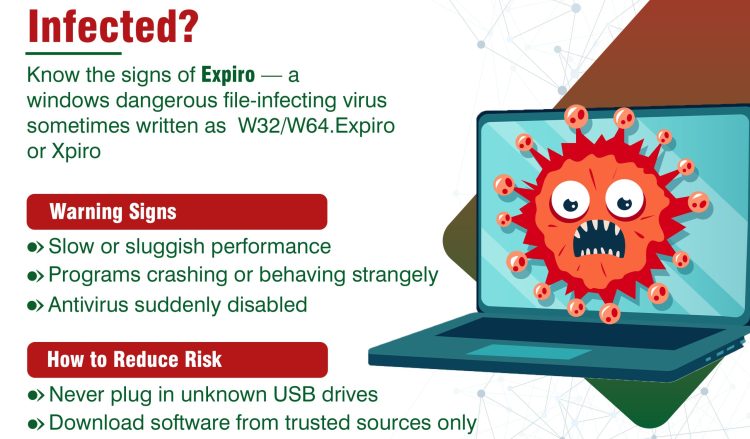
Among the many types of malware, file infector malware is one of the oldest and most persistent. It silently attaches itself to files you use every day, spreading each time those files are shared, copied, or run on another machine. One particularly dangerous file infector currently active on Windows systems is known as Expiro (sometimes written as W32/W64.Expiro or Xpiro).
This guide explains what Expiro is, how it works, why it is dangerous – especially in research and education environments – and, most importantly, what every person using MAREN-connected infrastructure can do to reduce the risk.
What Are File Infector Malware?
File infectors are a type of malware that attach themselves to legitimate files, especially programs (.exe files or .dll on Windows). Once the infected file is opened or run, the malware wakes up, does its damage, and may then look for more files to infect.
This is what happens when an infected file is opened:
- The malware activates in the background
- It can spread to other files on the system
- It may steal information or weaken system security
What makes file infectors particularly tricky is that the file still appears to work normally, and users often don’t realize it is infected.
Why File Infectors Are Dangerous
File Infectors pose a unique danger, especially within the interconnected, data-rich environment of a research and education (R&E) institution:
- They spread quietly through shared files
- They can infect multiple systems across departments
- They are difficult to detect without proper security tools
- They can compromise research data and institutional systems
In environments with shared labs and devices, one infected file can affect many users.
What makes Expiro especially dangerous is that it is polymorphic – meaning it can change its own appearance each time it copies itself. Think of a criminal who changes their disguise every time they enter a new building. This makes it harder for standard antivirus software to recognise and catch it.
| Real-World Impact: Why Expiro Is More Than Just an Inconvenience |
| In documented incidents, Expiro infections have resulted in:
• Breach of data protection laws (e.g., DPA, GDPR) where personal data is exposed. • Theft of login credentials for institutional email, VPNs, and research databases • Compromise of entire laboratory computer networks through a single infected USB device • Months-long undetected access to sensitive systems by remote attackers • Corruption or exposure of years of unpublished research data |
How Expiro Spreads
Understanding how Expiro spreads is the first step toward defense. For R&E users, three primary methods are relevant:
| # | Method | Description |
| 1 | Removable media | This is a classic and highly effective spreading method for Expiro.
• Infected USB drives used across multiple computers • Sharing flash drives between students, labs, or departments • External drives carrying infected files Plugging in an infected device can spread malware instantly. |
| 2 | File sharing & execution | This is the general method of infection once Expiro is on a system.
• Opening infected programs downloaded from the internet • Sharing executable files between users • Copying files from an infected shared network drive • Running software from unknown or unverified sources Once the file is opened, the malware activates and begins spreading. |
| 3 | Untrusted downloads | From:
• Cracked or pirated software • Fake tools or utilities • Software from unofficial websites These often contain hidden malware like Expiro. |
Warning Signs of Infection
- Programs behaving strangely or failing to open properly
- Antivirus alerts or being disabled unexpectedly
- Slow system performance
- Unknown files appearing or files changing unexpectedly
How to Reduce Risk
The good news is that protecting yourself and your institution from Expiro – and file infector malware in general – does not require specialist technical knowledge. The measures below are practical, actionable, and relevant to every member of the R&E community.
- Avoid using unknown or shared USB drives
- Scan external devices before opening files
- Never plug an unknown USB drive into any computer – even one found lying around, randomly given to you, or received as a promotional item
- Download software only from trusted sources
- Avoid using cracked, pirated, or unofficial versions of software
- Do not run unknown executable files (.exe)
- Disable AutoRun/AutoPlay on Windows computers – contact your IT department if you need help doing this
- Keep antivirus and systems updated
- Enable automatic Windows Updates
- Update all applications, not just Windows – browsers, PDF readers, and scientific tools, all require regular patching
Report Incidents Without Delay
| If You Suspect an Infection – Act Immediately |
| Do not ignore warning signs or assume the problem will resolve itself. Early reporting dramatically reduces the impact of a malware incident. If you suspect your machine, a USB drive, or a shared file has been infected:
1. Stop using the affected device and disconnect it from the network (remove the network cable or disable Wi-Fi) 2. Do not turn the device off (this may destroy forensic evidence helpful to IT investigators) 3. Contact your institution’s IT helpdesk or MAREN Security Team immediately 4. Note what you were doing when the issue began – this helps investigators understand the infection chain 5. Inform colleagues who may have received files from you recently, so they can take precautionary steps |
Remember
File infector malware spreads through everyday actions like opening or sharing files. In research and education environments, this can quickly impact multiple users and systems.
Be cautious with files. One infected file can spread across the entire network.

One Login, Wider Access: Strengthening Digital Access for Malawi’s Research and Education CommunityWARDS
A student from one university connecting securely to Wi-Fi while visiting another. A researcher accessing

MAREN Strengthens Capacity to Make Malawi’s Research More Accessible
Theses, dissertations, research papers and reports produced by Malawi’s universities and research institutions can have
